OpenAI Agents SDK
Run OpenAI Agents SDK sandbox agents in Platinum microVMs, with keys held outside the VM and a stop that keeps the agent's processes.
Last updated
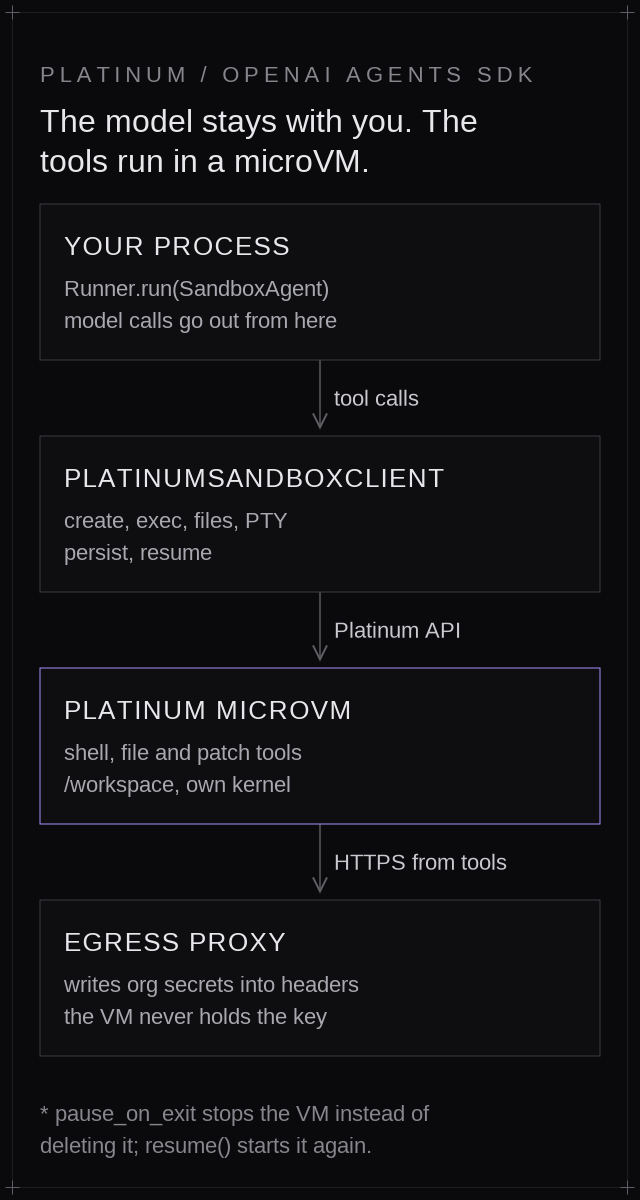
Run OpenAI Agents SDK SandboxAgents on Platinum. The agent's shell, file and patch tools run in a microVM of their own, not on your machine. The model calls stay in your process; only the tools run in the sandbox.
Install
The provider ships in the Python SDK as an optional extra. It needs Python 3.10 or later and openai-agents 0.25:
pip install 'platinum-sdk[openai-agents]'Run an agent in a sandbox
Pass a PlatinumSandboxClient in the run config. It reads PT_TOKEN and PT_API_URL from the environment:
from agents import RunConfig, Runner
from agents.sandbox import SandboxAgent, SandboxRunConfig
from platinum.openai_agents import PlatinumSandboxClient, PlatinumSandboxClientOptions

agent = SandboxAgent(name="dev", instructions="Work in the sandbox.")
result = await Runner.run(agent, "Write hello.py and run it.", run_config=RunConfig(
    sandbox=SandboxRunConfig(
        client=PlatinumSandboxClient(),
        options=PlatinumSandboxClientOptions(cpu=2, ram_mb=2048),
    ),
))
Each run gets a sandbox, works in /workspace, and deletes the sandbox when the run ends.
Bring git, Node or other tools
The default template, pt-base, has Python 3.12 but no git, curl or Node. Build a template from an image once:
from platinum import Platinum, Template

Template.from_image("python:3.12-slim").apt_install(["git", "curl", "nodejs", "npm"]).build(Platinum(), "agent-tools")
The build takes a minute or two. Pass the template's name, and every new sandbox starts with those tools:
PlatinumSandboxClientOptions(template="agent-tools")Keep API keys out of the sandbox
Tools that call an API need a key. Attach an organization secret instead of an environment variable. The egress proxy writes it into the allowed host's request headers, so code in the sandbox can use the key but never read it:
options = PlatinumSandboxClientOptions(secrets=["search-api"])Pause an agent and resume it
pause_on_exit=True stops the sandbox when the session closes instead of deleting it. A stop keeps memory and running processes when it can, and a stopped sandbox bills disk only. Save the session state, then resume it later, from another process if you like:
client = PlatinumSandboxClient()
session = await client.create(options=PlatinumSandboxClientOptions(pause_on_exit=True))
await session.start()
await session.exec("echo started > state.txt", timeout=30)
payload = client.serialize_session_state(session.state)
await session.aclose()  # stops the sandbox

session = await client.resume(client.deserialize_session_state(payload))
await session.start()   # the same sandbox, started again
A resumed sandbox that no longer exists is replaced, and its workspace is restored from the session's snapshot. See Stop and start for when a stop saves disk only.
What the provider supports
| SDK feature | On Platinum |
|---|---|
exec, with a timeout or none | Yes. Up to 80 s runs as one request; longer runs as a managed process |
| File read and write | Yes |
persist_workspace / hydrate_workspace | Yes, as a tar of the workspace |
Interactive commands (exec_command with a TTY, write_stdin) | Yes |
| Exposed ports | Yes, as preview URLs |
user= | Yes, with runuser |
| Cloud bucket mounts | No |
| Native snapshot persistence | No: workspaces persist as a tar |