Google ADK
Give a Google Agent Development Kit (ADK) agent tools that run shell commands, Python code and file operations in a Platinum microVM.
Last updated
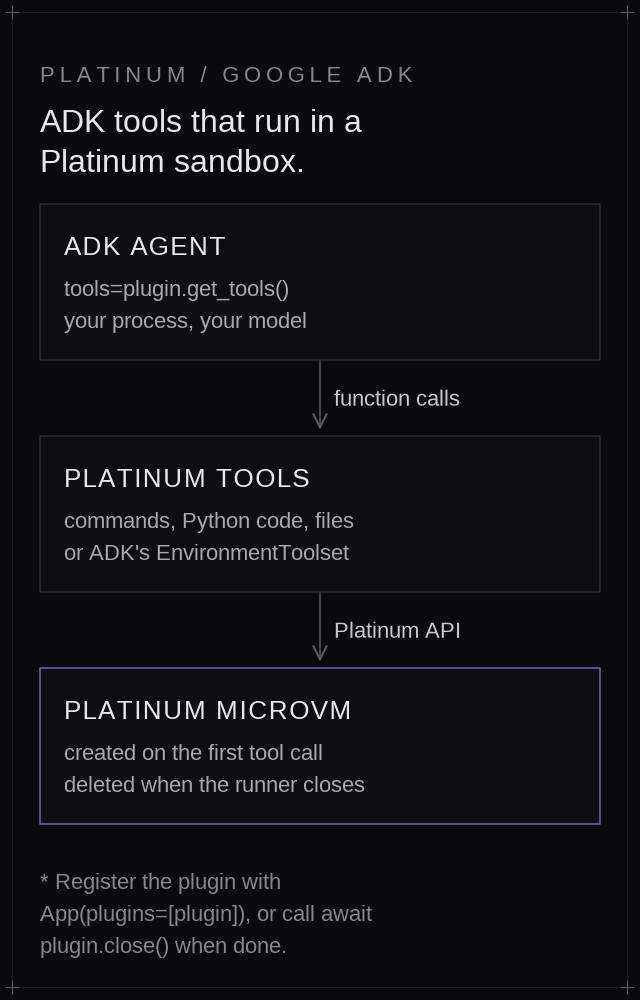
Give an ADK agent a Platinum sandbox to work in. PlatinumPlugin.get_tools() returns ADK tools that run shell commands, Python code and file operations in a microVM. The model and the agent loop stay in your process.
Install
The integration ships in the Python SDK as an optional extra. It needs Python 3.11 or later and google-adk 2.14 or a later 2.x:
pip install 'platinum-sdk[adk]'Run an agent in a sandbox
Give the agent the plugin's tools, and register the plugin with the app so that closing the runner deletes the sandbox. The plugin reads PT_TOKEN and PT_API_URL:
from google.adk.agents import Agent
from google.adk.apps import App
from platinum.adk import PlatinumPlugin

plugin = PlatinumPlugin(cpu=2, ram_mb=2048)

root_agent = Agent(
    model="gemini-flash-latest",
    name="sandbox_agent",
    instruction="Run code and shell commands in the Platinum sandbox.",
    tools=plugin.get_tools(),
)
app = App(name="sandbox_app", root_agent=root_agent, plugins=[plugin])
The sandbox is created on the first tool call and shared by every tool. Without plugins=[plugin], call await plugin.close() when the work is done.
| Tool | What it does |
|---|---|
execute_command_in_platinum | Runs a shell command (bash), with an optional cwd and timeout |
execute_code_in_platinum | Runs a Python 3 program, with optional argv and timeout |
write_file_to_platinum | Creates or overwrites a text file; parent directories are created |
read_file_from_platinum | Reads a text file; a long one is cut, with its size |
list_files_in_platinum | Lists a directory: name, type and size of each entry |
delete_platinum_sandbox | Deletes the sandbox when the task is done; the next call starts a new one |
| Behaviour | Detail |
|---|---|
| Working directory | /workspace, created on first use; relative paths resolve against it |
| Long commands | A timeout up to 80 s is one request; longer ones run as a managed process |
| Timeouts | timed_out, exit code 124, and the output printed before the deadline; the default is 300 s |
| Failures | Returned to the model as {"status": "error", "error": ...} instead of ending the run |
| Files | Large files move in parts of 16 MiB less 4 KiB |
Use ADK's environment tools
PlatinumEnvironment implements ADK's BaseEnvironment, so ADK's own EnvironmentToolset (Execute, ReadFile, EditFile, WriteFile) runs in a sandbox too. The runner closes the toolset, which deletes the sandbox:
from google.adk.tools.environment import EnvironmentToolset
from platinum.adk import PlatinumEnvironment

root_agent = Agent(
    model="gemini-flash-latest",
    name="coding_agent",
    instruction="Write and run code in the environment.",
    tools=[EnvironmentToolset(environment=PlatinumEnvironment(cpu=2, ram_mb=2048))],
)
Attach to a sandbox you already have
sandbox_id= attaches the tools to an existing sandbox and starts it if it is stopped. Closing leaves an attached sandbox running, and delete_platinum_sandbox refuses to delete it:
plugin = PlatinumPlugin(sandbox_id="sbx_...")Bring git, Node or other tools
The default template, pt-base, has Python 3.12 but no git, curl or Node. Build a template from an image once:
from platinum import Platinum, Template

Template.from_image("python:3.12-slim").apt_install(["git", "curl", "nodejs", "npm"]).build(Platinum(), "agent-tools")
The build takes a minute or two. Pass the template's name, and every new sandbox starts with those tools:
PlatinumPlugin(template="agent-tools")Keep API keys out of the sandbox
Pass org secrets at creation. The egress proxy writes each one into its allowed hosts' request headers, so the agent's commands use the key without holding it:
plugin = PlatinumPlugin(create_options={"secrets": ["search-api"]})See also
Pydantic AI
Give a Pydantic AI agent a Platinum sandbox as its workspace, so the harness's Coder, Shell and FileSystem tools run in a microVM of their own.
Mastra
Run a Mastra agent's workspace tools, commands, background processes and files in a Platinum microVM, through the @platinum-dev/mastra sandbox provider.