Mastra
Run a Mastra agent's workspace tools, commands, background processes and files in a Platinum microVM, through the @platinum-dev/mastra sandbox provider.
Last updated
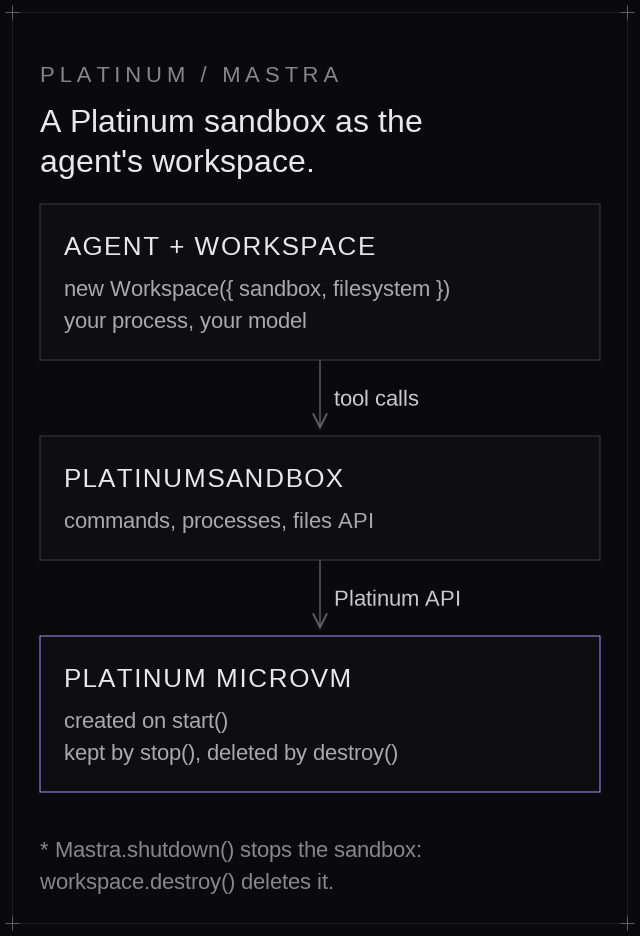
Give a Mastra agent a Platinum sandbox as its workspace sandbox. The workspace tools (execute_command, the background process tools, read_file, write_file, list_files and the rest) then run in a microVM of their own. The model and the agent loop stay in your process.
Install
The provider is its own package. It needs Node 22.13 or later and @mastra/core 1.80 or a later 1.x:
npm install @platinum-dev/mastra @mastra/coreRun an agent in a sandbox
Pass the sandbox and its filesystem to the workspace. It reads PT_TOKEN and PT_API_URL:
import { Agent } from '@mastra/core/agent';
import { Workspace } from '@mastra/core/workspace';
import { PlatinumSandbox } from '@platinum-dev/mastra';

const sandbox = new PlatinumSandbox({ cpu: 2, ramMb: 2048 });
const workspace = new Workspace({ sandbox, filesystem: sandbox.filesystem });

const agent = new Agent({ id: 'dev-agent', name: 'dev-agent', instructions: 'You are a coding agent.', model: 'openai/gpt-5', workspace });
await agent.generate('Write fib.py, run it and show me the output.');
await workspace.destroy();
Passing sandbox.filesystem backs the file tools with Platinum's files API, so they see the same disk as the commands. Relative paths resolve against /workspace in both. workspace.destroy() deletes the sandbox.
Continue in the same sandbox
Give the provider an id, and start() reattaches to the active sandbox named mastra-<id> or creates it. To attach to a sandbox you already have, pass sandboxId; read sandbox.sandboxId after start to keep it. stop(), which Mastra.shutdown() calls, stops the sandbox instead of deleting it, and the next start() resumes it. Pass pauseOnStop: false to delete it on stop instead.
What to expect from commands
| Behaviour | Detail |
|---|---|
| Timeout | Default 5 minutes; a timed-out command returns exit code 124 with timedOut: true and the output so far |
| Long commands | A timeout up to 80 s with no output callbacks is one request; longer ones, or ones you stream or abort, run as a managed process |
| Aborting | An abort kills the process in the sandbox |
| Background processes | sandbox.processes.spawn(); processes.get(pid) reattaches from another provider instance |
| Ports | sandbox.networking.getPortUrl(port) returns a signed preview URL |
| A stopped sandbox | Started again by the next operation; one deleted meanwhile is replaced |
Bring git, Node or other tools
The default template, pt-base, has Python 3.12 but no git, curl or Node. Boot an image instead. Platinum builds it on first use and caches it:
new PlatinumSandbox({ image: { base_image: 'node:22-bookworm-slim' } });Or build a template once and pass its name as template.
Keep API keys out of the sandbox
Pass org secrets when you create the provider. The egress proxy writes each one into its allowed hosts' request headers, so tools the agent runs can call those APIs without ever holding the key:
new PlatinumSandbox({ secrets: ['search-api'] });Limits
- Mastra checkpoints (
checkpointName,seedCheckpointName) are not supported.sandbox.snapshot()takes a disk snapshot instead. - No
computercapability and no FUSEmount(). Mount Platinum volumes with thevolumesoption.