Build a Python code interpreter
Give a model a Python interpreter in its own microVM. Variables persist between calls, and an idle interpreter sleeps and wakes with them intact.
Last updated
Run a code interpreter for your agent in a Platinum sandbox. Model-written code runs in its own microVM, never on your servers. Variables persist from one call to the next, and a stopped interpreter wakes on the next request with its variables in place.
Choose stateless or stateful
| You need | Use | What persists between calls |
|---|---|---|
| One snippet, one answer | runCode | Nothing: each call starts a fresh interpreter |
| A session the model builds on: load data once, then analyse it | An interpreter process, below | Variables, imports and open files |
Run one snippet
pt-base has Python 3.12 and pip. runCode runs a snippet and returns its output:
const r = await sbx.runCode("import math; print(math.pi)", { lang: "python" });
console.log(r.stdout);
r = sbx.run_code("import math; print(math.pi)", lang="python")
print(r.stdout)pt sandbox run-code $SBX 'import math; print(math.pi)' --lang pythonStart a stateful interpreter
The interpreter is a small HTTP server that runs every request in one shared namespace. Save it as interp.py:
import contextlib, http.server, io, json

NAMESPACE = {"__name__": "__main__"}  # shared by every request: this is the session

class Interpreter(http.server.BaseHTTPRequestHandler):
    def do_POST(self):
        code = self.rfile.read(int(self.headers["content-length"])).decode()
        out = io.StringIO()
        try:
            with contextlib.redirect_stdout(out), contextlib.redirect_stderr(out):
                exec(compile(code, "<cell>", "exec"), NAMESPACE)
            result = {"ok": True, "output": out.getvalue()}
        except Exception as e:
            result = {"ok": False, "output": out.getvalue(), "error": f"{type(e).__name__}: {e}"}
        body = json.dumps(result).encode()
        self.send_response(200)
        self.send_header("content-type", "application/json")
        self.send_header("content-length", str(len(body)))
        self.end_headers()
        self.wfile.write(body)

http.server.HTTPServer(("", 8888), Interpreter).serve_forever()
Create a sandbox, copy the server in, start it as a managed process and expose its port:
import os
from platinum import Platinum

client = Platinum(api_url=os.environ["PT_API_URL"], token=os.environ["PT_TOKEN"])
sbx = client.sandboxes.create(template="pt-base", auto_stop_minutes=10, wait_for_running=True)
sbx.files.write("/root/interp.py", open("interp.py", "rb").read())
sbx.process.start(["python3", "/root/interp.py"])
preview = sbx.expose(8888)
The preview URL carries its own token. Keep it on your server, not in the model's context.
Send code to it
POST the code and read the JSON back. Give run to your model as a tool:
import json, urllib.request

def run(code: str) -> dict:
    req = urllib.request.Request(preview["url"], data=code.encode())
    with urllib.request.urlopen(req, timeout=60) as resp:
        return json.load(resp)

run("import statistics; data = [3, 1, 4, 1, 5]")
run("print(statistics.mean(data))")  # {'ok': True, 'output': '2.8\n'}
run("undefined_name")                # {'ok': False, 'output': '', 'error': "NameError: name 'undefined_name' is not defined"}
An error comes back as data, so the model can read it and try again.
Let it sleep between turns
auto_stop_minutes stops the sandbox once it has been idle that long. Requests to the preview URL count as activity, so an interpreter in use stays up. A stopped sandbox bills disk only.
The next request to a stopped interpreter starts the sandbox, then reaches the server. When the stop saved memory, every variable is still there:
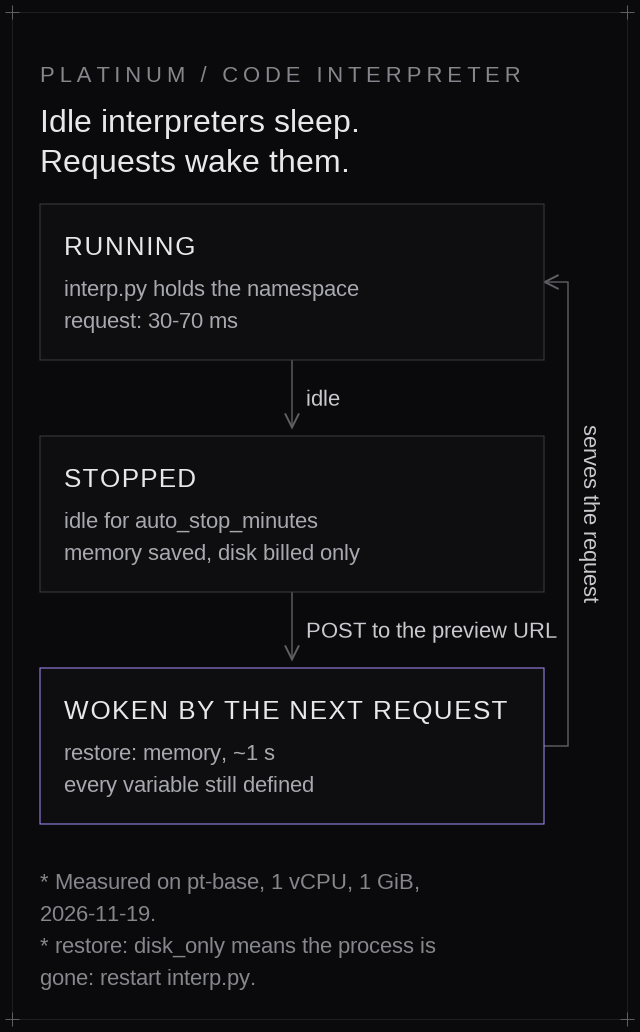
| Request | Measured on pt-base, 1 vCPU, 1 GiB |
|---|---|
| To a running interpreter | 30–70 ms |
| First one after a stop | About 1 second, variables intact |
A start that reports restore: "disk_only" kept the files but not the process. Start interp.py again and replay the setup cells. Stop and start lists when a stop saves disk only.
Limit what model code can reach
Install the packages the model needs, then cut outbound traffic. Requests through the preview URL still reach the interpreter:
pt sandbox exec $SBX --timeout 80 'pip install -q pandas'
pt sandbox network $SBX --deny-out all
Code that tries to reach the internet now fails, and the error comes back to the model like any other. To allow a few hosts, see Allow only some destinations.
See also
- Exec:
runCodelanguages and timeouts - Managed processes: read the interpreter's logs, restart it
- Stop and start: when a stop keeps memory
- Networking: previews and egress rules
- Code execution sandbox for AI agents: choose by isolation boundary, saved state and network reach