Run Claude Code in a cloud sandbox
Run Claude Code headless in a Platinum sandbox, one microVM per task, with the API key held outside the VM and a stop that keeps the agent running.
Last updated
Run Claude Code in a Platinum sandbox to give every task its own microVM. The agent installs packages, runs tests and edits files there, never on your machine. A stop pauses it with its processes intact.
For an agent that lives in a sandbox as your development machine, see Develop inside a sandbox.
Store the API key outside the sandbox
Store your Anthropic key as an organization secret. The egress proxy writes it into the x-api-key header of requests to api.anthropic.com. The sandbox never holds the value, so code the agent runs cannot print it.
printf '%s' "$ANTHROPIC_API_KEY" | pt secret create anthropic --allow api.anthropic.com --header x-api-key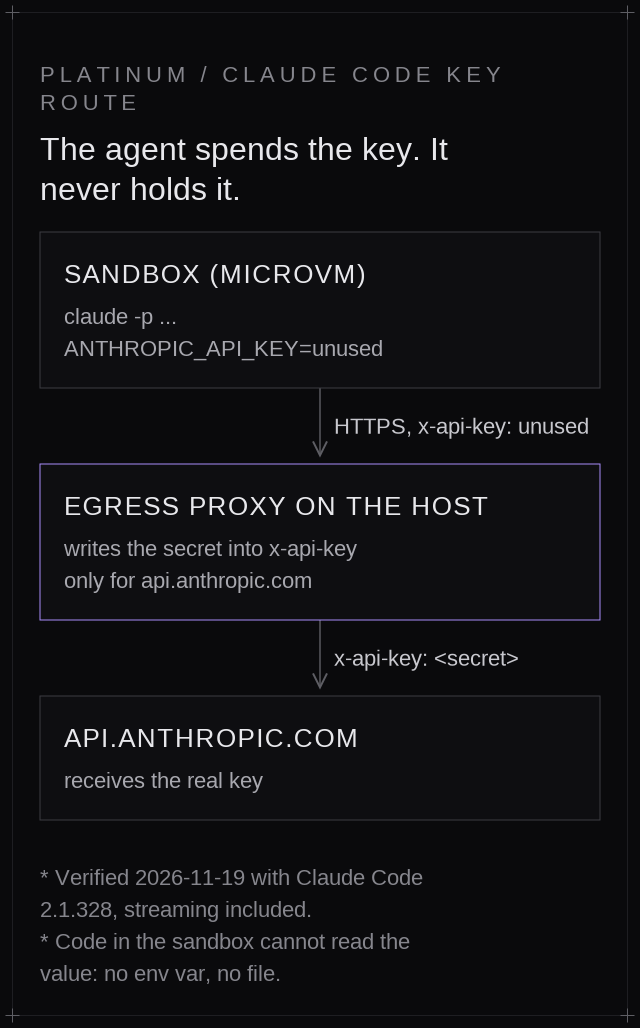
Create a sandbox
pt-base is Debian 13 with Python and no Node. Attach the secret and give the agent room. Claude Code wants a key to start: unused satisfies it, and the proxy overwrites the header on every request.
SBX=$(pt sandbox create -t pt-base --name claude-task --secret anthropic --env ANTHROPIC_API_KEY=unused --cpu 2 --ram 4096 --disk 10 -q)Install Claude Code
pt sandbox exec waits 30 seconds by default and about 85 seconds at most. Run the install as a managed process; it takes a minute or two:
pt api POST /v1/sandboxes/$SBX/processes -d '{"cmd": "sh -c \"apt-get update && apt-get install -y curl git nodejs npm && npm install -g @anthropic-ai/claude-code > /root/install.log 2>&1\""}'Then confirm the agent reaches the API through the proxy:
pt sandbox exec $SBX --timeout 80 'IS_SANDBOX=1 claude -p "Reply with OK"'To skip the install on every task, build the same steps into a template once, as in Build the template.
Run a task
Write the task as a script, copy it in, and start it as a managed process. It keeps running after your command returns:
cat > task.sh <<'EOF'
cd /root && git clone https://github.com/your-org/your-repo app && cd app
IS_SANDBOX=1 claude -p "Run the tests and fix the first failure" \
  --dangerously-skip-permissions --output-format json > /root/result.json
EOF
pt sandbox cp task.sh $SBX:/root/task.sh
pt api POST /v1/sandboxes/$SBX/processes -d '{"cmd": "sh /root/task.sh"}'
Claude Code refuses --dangerously-skip-permissions as root. IS_SANDBOX=1 tells it the sandbox is the boundary; Run the agent as a non-root user avoids it. Copy the result out when the process ends:
pt sandbox cp $SBX:/root/result.json ./result.jsonLimit where the agent can connect
Allow only the hosts the task needs. The secret's host stays reachable:
pt sandbox network $SBX --allow-out github.com,*.github.com,registry.npmjs.org --deny-out allSee Allow only some destinations for the rules.
Pause it, keep the session
Stop the sandbox while the agent waits for review. The stop saves memory and running processes when it can:
pt api POST "/v1/sandboxes/$SBX/stop?wait_for_state=stopped"    # "memory_saved": true
pt api POST "/v1/sandboxes/$SBX/start?wait_for_state=running"   # "restore": "memory"
restore: "memory" means the same processes continue. "disk_only" means files survived and the agent restarts. A stopped sandbox bills disk only. Stop and start lists when a stop saves disk only.
Run attempts in parallel
Fork a configured sandbox to try two approaches at once. A fork copies the disk and boots fresh, so Claude Code is installed but no process carries over:
pt sandbox fork $SBXSee also
- Run Codex in a cloud sandbox
- Develop inside a sandbox
- Secrets and Networking
- Run Docker in a sandbox: let the agent build and run containers
- Claude Code remote: SSH in from any device, a tmux session that survives a stop
- Background agents: many coding agents in parallel, one sandbox each