Run Docker in a sandbox
Run Docker and Compose in a Platinum sandbox, a real dockerd in its own microVM with no --privileged and no host socket, and a stop that keeps containers running.
Last updated
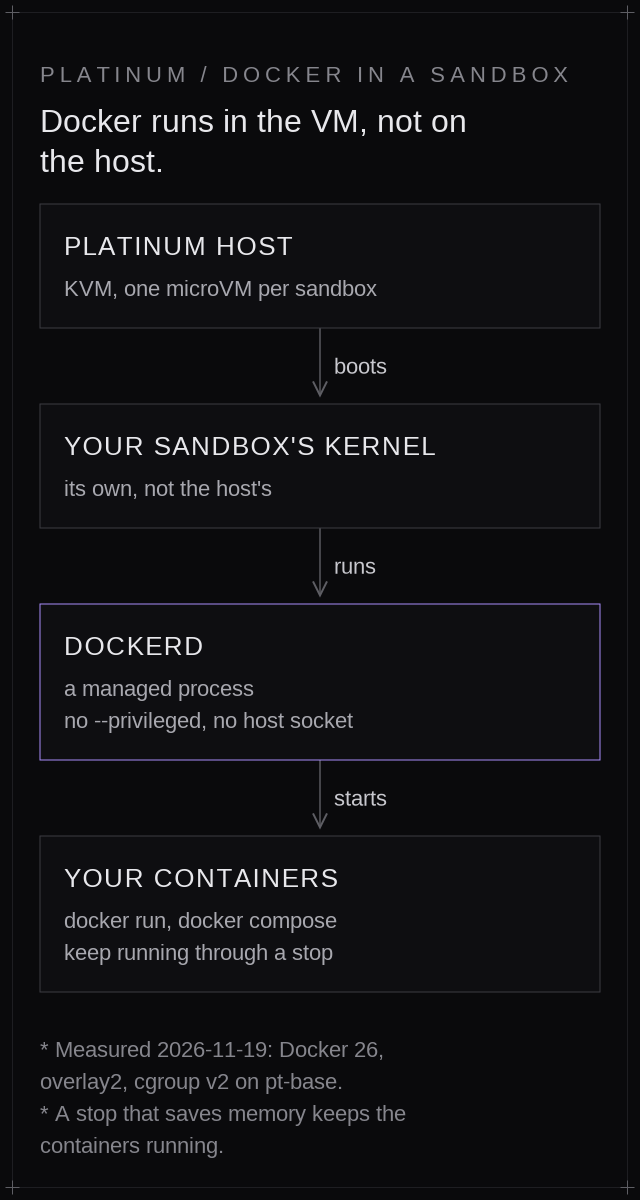
Run Docker inside a Platinum sandbox, without Docker in Docker's privileged containers. Each sandbox is a microVM with its own kernel, so dockerd runs there as on any VM: no privileged container, no mounted host socket, nothing shared with other sandboxes. A stop keeps your containers running.
Install Docker
pt-base is Debian 13. Install Docker and Compose from Debian as a managed process; it takes about a minute:
SBX=$(pt sandbox create -t pt-base --cpu 2 --ram 2048 --disk 10 -q)
pt api POST /v1/sandboxes/$SBX/processes -d '{"cmd": "sh -c \"apt-get update && apt-get install -y docker.io docker-compose > /root/install.log 2>&1\""}'
To skip the install on every sandbox, build it into a template once.
Start the daemon
Run dockerd as a managed process, so it keeps running after the request returns:
pt api POST /v1/sandboxes/$SBX/processes -d '{"cmd": "dockerd"}'
pt sandbox exec $SBX 'docker run --rm hello-world'
On pt-base, Docker uses the overlay2 storage driver and cgroup v2.
Run a Compose stack
Copy a Compose file in and bring it up. This one runs Redis and a second container that increments a counter in it every second:
services:
  redis:
    image: redis:7-alpine
  counter:
    image: redis:7-alpine
    command: sh -c 'while true; do redis-cli -h redis incr hits > /dev/null; sleep 1; done'
    depends_on: [redis]
pt sandbox exec $SBX 'mkdir -p /root/app'
pt sandbox cp compose.yaml $SBX:/root/app/compose.yaml
pt sandbox exec $SBX --timeout 80 'cd /root/app && docker compose up -d'
pt sandbox exec $SBX 'cd /root/app && docker compose exec -T redis redis-cli get hits'Stop it and keep the containers running
Stop the sandbox when nothing needs it. When the stop saves memory, dockerd and every container continue where they were:
pt api POST "/v1/sandboxes/$SBX/stop?wait_for_state=stopped"    # "memory_saved": true
pt api POST "/v1/sandboxes/$SBX/start?wait_for_state=running"   # "restore": "memory"
pt sandbox exec $SBX 'cd /root/app && docker compose ps'
In our run, the counter read 14 before the stop and kept counting after the start, 16, then 19. It never reset. A stopped sandbox bills disk only.
| After | Containers | Images and volumes |
|---|---|---|
A stop with restore: "memory" | Still running | Kept |
A stop with restore: "disk_only" | Stopped: start dockerd and docker compose up -d again | Kept |
| A fork | Not running: the fork boots fresh from a copy of the disk | Copied |
Stop and start lists when a stop saves disk only.
Compare the ways to run Docker
| Setup | What the containers can reach |
|---|---|
Docker in Docker with --privileged | Nearly every capability of the host, whose kernel they share |
A mounted /var/run/docker.sock | The host's own Docker daemon, and so every container on the host |
| Docker in a Platinum sandbox | Only the sandbox: its own kernel, its own dockerd |
See also
- Managed processes: keep
dockerdand other servers running - Templates: bake Docker into an image once
- Networking: expose a container's port with a preview URL
- Run Claude Code in a cloud sandbox: a coding agent that can build and run containers