Run Codex in a cloud sandbox
Run the Codex CLI headless in a Platinum sandbox, one microVM per task, with the OpenAI key held outside the VM and a stop that keeps the agent running.
Last updated
Run the Codex CLI in a Platinum sandbox to give every task its own microVM. Codex edits, builds and tests there with no approval prompts, because the VM is the boundary. A stop pauses it with its processes intact.
Store the API key outside the sandbox
Store your OpenAI key as an organization secret. The egress proxy writes Authorization: Bearer … into requests to api.openai.com, so the sandbox never holds the key.
printf 'Bearer %s' "$OPENAI_API_KEY" | pt secret create openai --allow api.openai.com --header authorization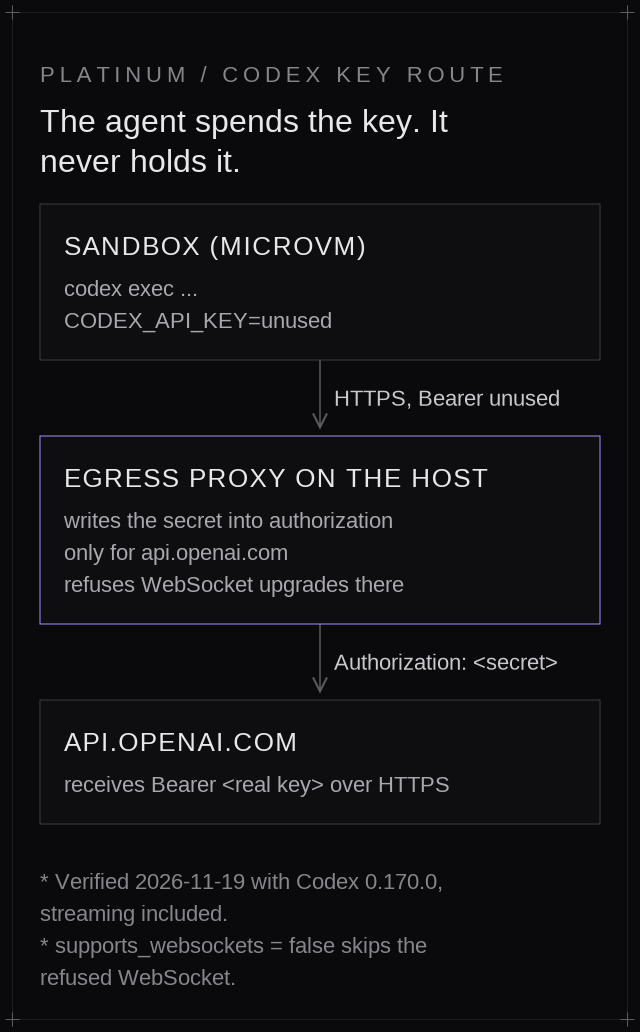
Create a sandbox
pt-base is Debian 13 with Python and no Node. Attach the secret and give the agent room. Codex reads CODEX_API_KEY at startup: unused satisfies it, and the proxy overwrites the header on every request.
SBX=$(pt sandbox create -t pt-base --name codex-task --secret openai --env CODEX_API_KEY=unused --cpu 2 --ram 4096 --disk 10 -q)Install Codex
pt sandbox exec waits 30 seconds by default and about 85 seconds at most. Run the install as a managed process; it takes a minute or two:
pt api POST /v1/sandboxes/$SBX/processes -d '{"cmd": "sh -c \"apt-get update && apt-get install -y curl git nodejs npm && npm install -g @openai/codex > /root/install.log 2>&1\""}'Use HTTPS, not WebSocket
Codex opens a WebSocket first. The proxy refuses WebSocket upgrades to a host it writes a secret for, so Codex retries for about 8 seconds before it falls back to HTTPS. Point it at HTTPS from the start, then confirm the route:
cat > config.toml <<'EOF'
model_provider = "openai-https"

[model_providers.openai-https]
name = "OpenAI over HTTPS"
base_url = "https://api.openai.com/v1"
env_key = "CODEX_API_KEY"
wire_api = "responses"
supports_websockets = false
EOF
pt sandbox exec $SBX 'mkdir -p /root/.codex'
pt sandbox cp config.toml $SBX:/root/.codex/config.toml
pt sandbox exec $SBX --timeout 80 'codex exec --skip-git-repo-check "Reply with OK"'
To skip the install and config on every task, build them into a template once.
Run a task
Write the task as a script, copy it in, and start it as a managed process:
cat > task.sh <<'EOF'
cd /root && git clone https://github.com/your-org/your-repo app && cd app
codex exec --dangerously-bypass-approvals-and-sandbox --json \
  -o /root/last-message.txt "Run the tests and fix the first failure" > /root/events.jsonl
EOF
pt sandbox cp task.sh $SBX:/root/task.sh
pt api POST /v1/sandboxes/$SBX/processes -d '{"cmd": "sh /root/task.sh"}'
--dangerously-bypass-approvals-and-sandbox turns off Codex's own sandbox and prompts. Codex documents it for environments that are sandboxed from outside, which a microVM is. --json streams events; -o writes the final message. Copy them out when the process ends:
pt sandbox cp $SBX:/root/last-message.txt ./last-message.txtLimit where the agent can connect
Allow only the hosts the task needs. A secret's host stays reachable:
pt sandbox network $SBX --allow-out github.com,*.github.com,registry.npmjs.org --deny-out allSee Allow only some destinations.
Pause it, keep the session
Stop the sandbox while a change waits for review:
pt api POST "/v1/sandboxes/$SBX/stop?wait_for_state=stopped"    # "memory_saved": true
pt api POST "/v1/sandboxes/$SBX/start?wait_for_state=running"   # "restore": "memory"
restore: "memory" means the same processes continue. "disk_only" means files survived and the task restarts. A stopped sandbox bills disk only. Stop and start lists when a stop saves disk only.
Run attempts in parallel
Fork a configured sandbox to try two fixes at once. The fork copies the disk and boots fresh:
pt sandbox fork $SBXSee also
Run Claude Code in a cloud sandbox
Run Claude Code headless in a Platinum sandbox, one microVM per task, with the API key held outside the VM and a stop that keeps the agent running.
Develop inside a sandbox
Turn a sandbox into a persistent development machine with an agent inside it that can spawn its own child sandboxes.