Background agents
Run background agents in separate cloud VMs
Run parallel background agents in isolated cloud VMs, keep work alive beyond a request, and choose between memory resume and disk-only forks.
Run parallel background agents in separate Platinum microVMs: give each Claude Code or Codex worker its own sandbox, and use managed processes for work that must outlive the starting request. Keep orchestration outside the worker so a disconnected client does not become the job's lifetime limit.
Separate the workers#
Use one prepared template for the toolchain and one sandbox per task. Each Platinum sandbox is an isolated microVM. Separate workers can edit their own repositories without competing over the same checkout, build directory or listening port.
An agent living inside a sandbox can create concurrent child sandboxes with a sandbox-scoped key. That key covers the parent and its children, not the rest of the organization. Children using the same key create siblings, not recursive descendants. Keep the work pool flat.
Keep the request separate from the job#
Managed processes let a server, build or agent continue after the starting request returns. Save the process handle in your orchestrator. Reconnect to read output and inspect the exit code rather than treating a successful start as a completed task.
Launch tasks concurrently in two existing running sandboxes with the TypeScript SDK:
import { Platinum } from "@platinum-dev/sdk";

const client = new Platinum({
  url: process.env.PT_API_URL!,
  token: process.env.PT_TOKEN!,
});
const ids = [process.env.WORKER_A_ID!, process.env.WORKER_B_ID!];
const tasks = ["Review the auth module", "Review the test suite"];
await Promise.all(ids.map(async (id, i) => {
  const sandbox = await client.sandboxes.connect(id);
  const proc = await sandbox.process.start({
    cmd: ["claude", "-p", tasks[i]],
    cwd: "/workspace",
  });
  for await (const event of proc.stream()) {
    console.log(id, event); // keep each worker's output and exit event
    if (event.type === "exit") break;
  }
}));
Prepare each worker with Claude Code, authentication and a repository at /workspace first. Set WORKER_A_ID and WORKER_B_ID to distinct sandbox IDs. Claude Code's programmatic CLI accepts claude -p for non-interactive runs; configure tool permissions before unattended execution. The example prints the complete exit event; your orchestrator must inspect its exit status before marking the task successful.
Process output is buffered, not durable storage. Consume important logs while the worker runs and persist the task result separately.
Choose what must survive#
A disconnected client, an idle worker and a branched task need different operations:
| Need | Use | State to expect |
|---|---|---|
| Continue after the request ends | Managed process | Runs while its sandbox stays running |
| Pause the same worker | Stop, then start | Memory and processes return when restore is memory |
| Try a second approach | Fork | A new sandbox cold-boots from disk; no running processes carry over |
| Recover from a backup | Restore from backup | Files from the completed backup; no memory |
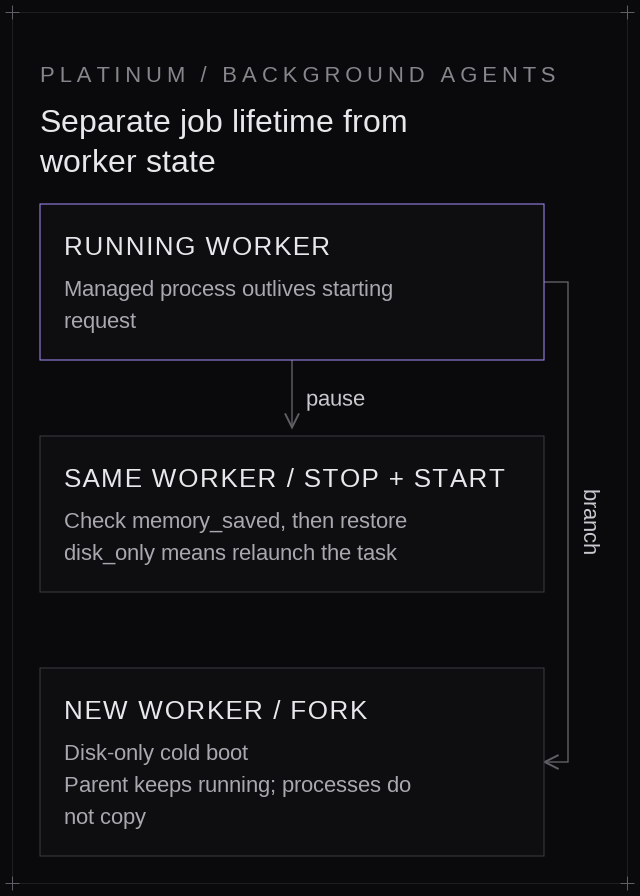
Check memory_saved on stop and restore on start. A successful stop can save only disk; a start reporting disk_only means the old processes are gone. Have the orchestrator relaunch the task from persisted progress in that case. Stop and start documents the fallback conditions.
A fork leaves the parent running and reserves the parent's full CPU, RAM and disk for the new sandbox. Budget fan-out against capacity, not just task count. Detach mounted volumes before cloning or forking; their history is separate from the sandbox snapshot.
Sources checked November 2026: sandbox lifecycle, worker setup, managed processes, snapshots, Claude Code CLI.