Security
AI agent security: three controls a sandbox gives you
Isolation, an egress allowlist and API keys the agent can spend but never read: what each control stops, shown working on Platinum, and where each one ends.
AI agent security comes down to three controls you can check: isolate the agent, limit where it can connect, and give it keys it can use but not read. We ran each one on Platinum with a coding agent and a fake key, and wrote down what each control stops and what it does not.
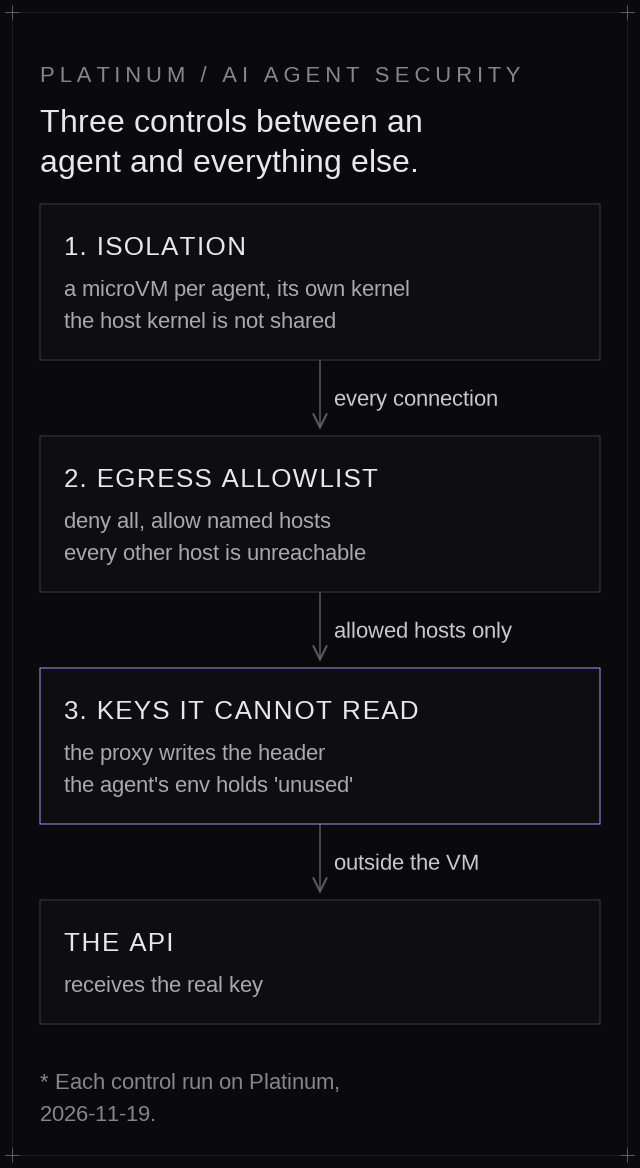
Isolate each agent in its own kernel#
A container shares the host's kernel, so a kernel exploit in one reaches the machine. A Platinum sandbox is a microVM: the agent gets its own kernel, and the host's is not in reach. Give every agent, or every task, a sandbox of its own, and a compromised agent compromises one VM.
Deny egress by default#
A prompt-injected agent that can reach any host can send your code anywhere. Deny everything, then allow the hosts the task needs:
pt sandbox network $SBX --allow-out github.com,registry.npmjs.org --deny-out allIn our run, github.com answered and example.com failed. The API host of a key attached to the sandbox stayed reachable: Platinum adds it to the policy on its own. Allow only some destinations has the rules.
Give it keys it cannot read#
An agent with OPENAI_API_KEY in its environment can print it, and so can any code it runs. A Platinum secret is stored once, outside the sandbox. On each request to an allowed host, the egress proxy writes it into the named header. The sandbox holds a placeholder.
We tested it with Claude Code and the Codex CLI, a fake key, and the placeholder unused:
| What we checked | What we saw |
|---|---|
| The agent's environment | Placeholders only: ANTHROPIC_API_KEY=unused, CODEX_API_KEY=unused |
| A server behind the proxy | x-api-key: sk-ant-PROOF-…, the stored value |
| OpenAI's own reply to Codex | "Incorrect API key provided: sk-PROOF…9c1d", the stored value |
With a real key, those requests carry the real key, and the agent still cannot read it.
Know where each control ends#
| Control | Stops | Does not stop |
|---|---|---|
| Isolation | Reaching the host or other agents | Misuse inside the VM it was given |
| Egress allowlist | Connections to unlisted hosts | Data sent to a host you allowed |
| Secrets | Reading or printing the key | Spending the key on allowed hosts |
Two details matter in practice. Secrets ride HTTP/1.1 only, and the proxy refuses WebSocket upgrades to a host it writes a key for, so set Codex to HTTPS as in Run Codex in a cloud sandbox. And an allowed host that echoes request headers back would reveal the key, so allow API hosts, not debugging endpoints.
Sources, checked November 2026: secrets, networking, sandboxes. Tests run 2026-11-19 on Platinum's development environment with Claude Code 2.1.328, Codex 0.170.0 and a fake key.