Persistence
Stop keeps memory: pause an agent sandbox mid-task
Stop a Platinum sandbox while an agent waits, then start it with its memory and processes back. Two response fields tell you which kind of resume you got.
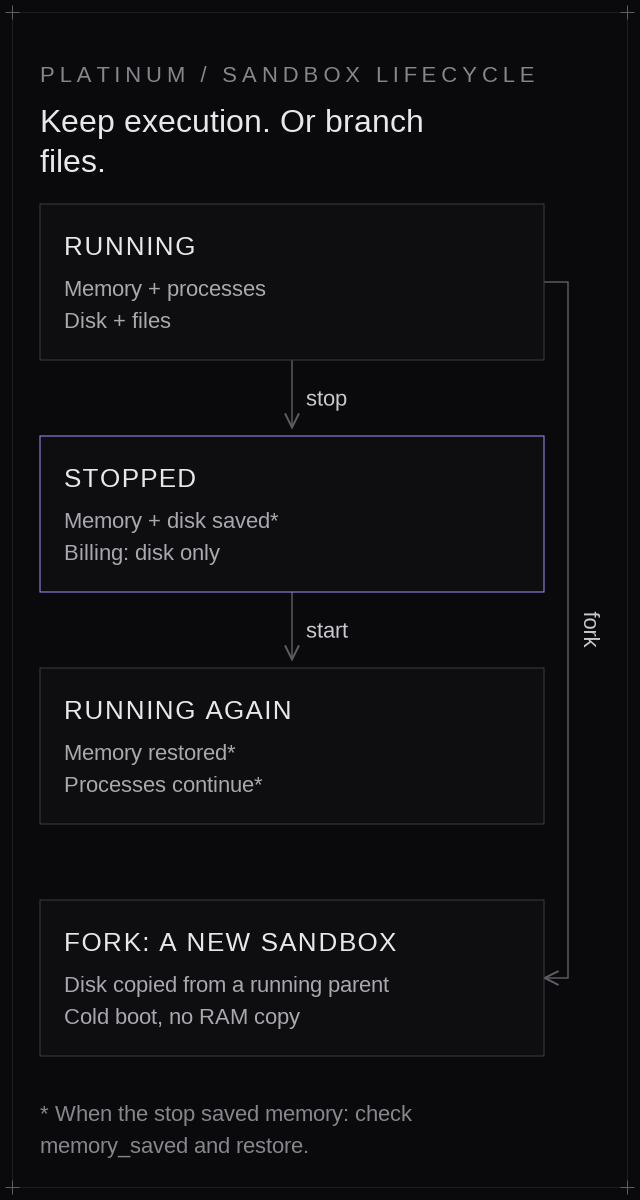
stop pauses a Platinum sandbox mid-task. start brings it back with its memory and running processes whenever the stop could save them. An agent waiting on a person stops paying for CPU and RAM, then picks up where it left off.
Two fields tell you what came back#
A stop does not always save memory. Read the responses instead of assuming.
| Field | Value | Do this |
|---|---|---|
memory_saved on stop | true | Expect a memory resume, then confirm with restore. |
memory_saved on stop | false | The next start cold-boots. Restart from files. |
memory_saved on stop | null | Unknown. Do not treat it as success. |
restore on start | "memory" | Processes and RAM are back. Continue. |
restore on start | "disk_only" | Files only. Restart the workload. |
state: "running" never tells you which case you are in. restore does.
Pause and resume#
import { Platinum } from "@platinum-dev/sdk";

const client = new Platinum({ url: "https://api.platinum.dev", token: process.env.PT_TOKEN });
const sbx = await client.sandboxes.connect(process.env.SBX);

await sbx.stop({ waitForStopped: true });
await sbx.start({ waitForRunning: true });
Over HTTP, the stop response carries the field directly. This is the example from the docs, and it is the disk-only case:
curl -sS -X POST "$PT_API_URL/v1/sandboxes/$SBX/stop?wait_for_state=stopped" -H "Authorization: Bearer $PT_TOKEN"
# {"id":"sbx_01K…","state":"stopped","memory_saved":false}
The stop completed; the interpreter session did not survive it. If a wait times out, the API answers 202 with wait_timed_out: true: poll, do not assume.
A request to a sandbox's preview URL can auto-resume it. Set auto_resume: false if only your controller should start it.
When a stop saves disk only#
Memory is skipped when the guest is unresponsive or cannot freeze its filesystem, the host is low on disk, the sandbox is still loading memory from its last resume, or it boots from a root_volume. A saved image can also fail to load on the next host, so check restore even after memory_saved: true. The full list is in what a stop saved.
Stop is not fork#
| Operation | What comes back |
|---|---|
stop → start | The same sandbox, with memory and processes when restore is "memory". |
snapshot → restore | The disk as it was. No processes. |
fork | A new sandbox that cold-boots from a copy of the disk. The parent keeps running. |
To branch an agent's work, write its state to disk first. A variable that only lived in RAM is not in the fork. See snapshots and forks.
What a stopped sandbox costs#
Disk only: the configured disk_gb, no CPU or RAM (billing). Retained snapshots bill separately.
A stop is not a backup. It returns before its snapshot finishes copying off the host. If that host is lost first, start reports relocation_snapshot_unavailable, and backups restore disk, not memory.